
| VB 2008 Express Edition: for novices | VB 2008 .NET: for developers |
|---|---|
| Visual Basic GUI | Visual Basic command prompt |
 Windows Application
 |
Console Application |
|
Reusable components or class libraries Example: Web Starter Kits, Movie Collection Starter Kits, etc. at http://msdn2.microsoft.com/en-us/vbasic/ms789080.aspx" |
Reusable components or class libraries
|
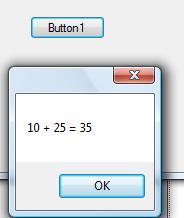
1 File-->New Project-->Choose Windows Form Application 2 Drag a button from the toolbox 3 Double click the background and code the following - declare and initialize variables - type the calculation - use the command to show results: ' Console.WriteLine("result is " & sum) |
1 Module must have "Sub Main()" ... "End Sub" statements 2 Declare and initialize variables (eg. Integer, String, Double) 3 Write to command prompt. No Graphics. 4 Change the numerical variables (eg.number1, sum and number2) to strings using variable_name.ToString() in the Console.WriteLine statement. 2 Drag the "Start without debugging" (commands) to the Debug menu 3 Close |
 |
 |